

Home office lighting has one job that matters more than looks: keeping your eyes comfortable and your focus steady through a full working day. Get it right and you'll notice fewer headaches, less afternoon fatigue, and better screen visibility. This guide covers how to layer office lighting, the ideal brightness and color temperature for work, how to kill monitor glare, and where smart lighting genuinely helps.
The Three Layers of Office Lighting
A well-lit office, like any well-lit room, combines three layers — but the office weights them differently than a living room does, putting task light front and center.
Ambient light fills the room with general illumination so there's no harsh contrast between a bright screen and a dark room — that contrast is a major cause of eye strain. It usually comes from a ceiling fixture. Task light is the office's most important layer: focused, adjustable light right at the work surface for reading documents, writing, and detailed work. Accent light adds depth and reduces the flat, clinical feel of an all-overhead setup, while making the space somewhere you actually want to spend eight hours.
The mistake most home offices make is relying on a single overhead light. One fixture creates shadows on the desk (your own body blocks the light), leaves the screen fighting the background, and gives you no control over mood or intensity. Layering fixes all three. For the general principles behind layering any room, the layered lighting guide goes deeper.
Task Lighting: The Most Important Layer
If you improve only one thing in a home office, make it the task light. Focused, adjustable light at the desk is what reduces the eye strain, headaches, and fatigue that come from staring at a screen and reading documents for hours.
The key qualities to look for: adjustability (a lamp you can angle and position exactly where the work is), the right placement (light should come from the side, ideally opposite your writing hand, so your hand doesn't cast a shadow on what you're writing), and appropriate brightness without harshness. A desk lamp is the classic solution; a floor lamp beside the desk works when desk space is tight or you want a softer, higher light source.
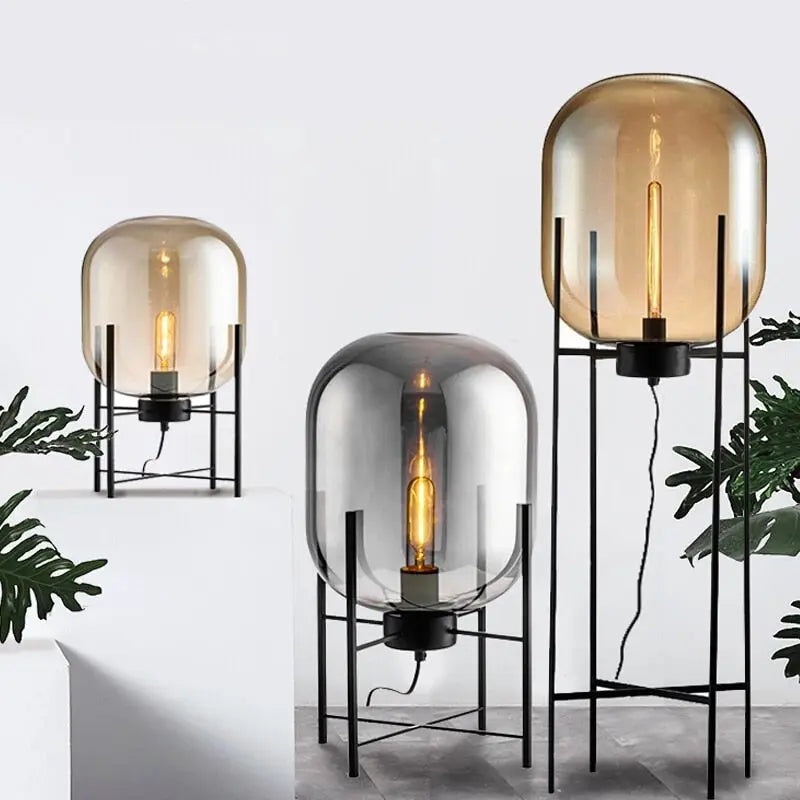
A floor lamp like the Glowlia Glass Shade Floor Lamp sits beside the desk and delivers adjustable light without taking up work surface — useful in compact offices. Position any task light so it illuminates the work area, not the screen, and never place it where the bulb is directly in your field of view. Browse options in the floor lamp and table lamp collections.
Ambient Lighting: Balancing the Room
Ambient light prevents the single most overlooked source of office eye strain: a bright screen in a dim room. When your monitor is far brighter than its surroundings, your eyes constantly readjust between the two, which is exhausting over a full day. A good overhead fixture raises the whole room's light level so the screen doesn't stand out so sharply.
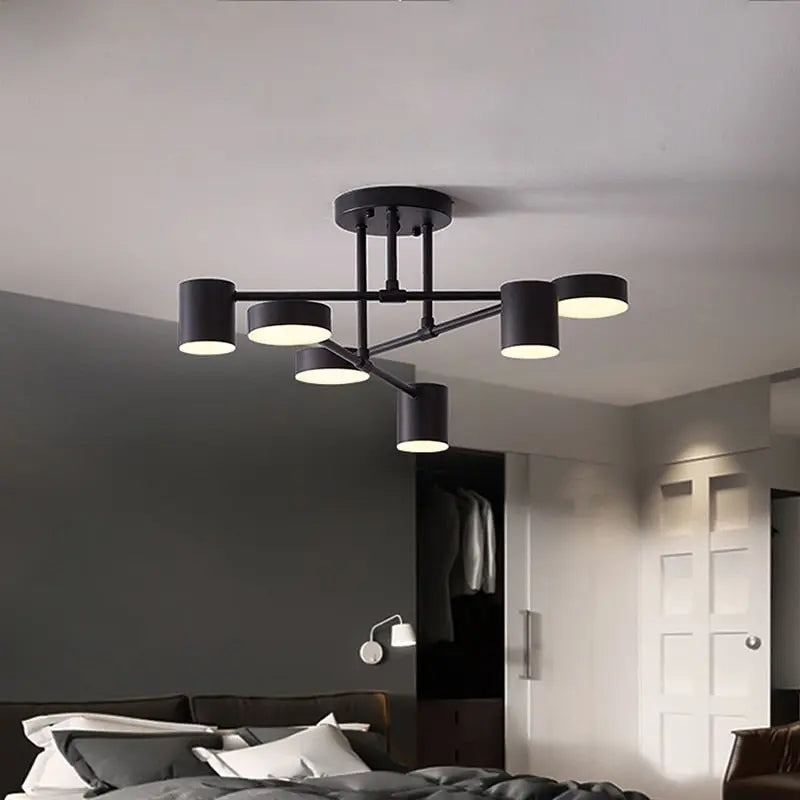
The overhead fixture can be as simple or as characterful as the room calls for — a flush ceiling light for a purely functional office, or a fixture with some presence like the Belia Modern Ceiling fixture if the office doubles as a video-call background or a room you want to enjoy. What matters functionally is even, diffused light that fills the room without creating hotspots or glare on the screen. Explore the range in the ceiling lights and pendant lighting collections.
Getting the Brightness and Color Right
This is where most office lighting advice stays vague — here are the actual targets.
Brightness (Lux and Lumens)
General office work wants roughly 300–500 lux at the desk surface — brighter than a living room, since you're doing focused visual work. Detailed tasks (fine reading, drawing, crafts) push toward 500–750 lux. In practical bulb terms, that means a task lamp delivering a few hundred lumens focused on the work area, plus ambient light filling the room. Too dim forces your eyes to strain; too bright creates glare and its own fatigue — the goal is comfortable, even brightness across the whole visual field, not one intense pool.
Color Temperature
Color temperature shapes both alertness and comfort. For daytime focused work, a neutral-to-cool white in the 3500K–4500K range supports alertness and concentration — it mimics daylight and keeps you sharp. In the evening, or if the office doubles as a relaxing space, warmer light (3000K) is gentler. This is exactly where adjustable and smart lighting earns its place: cooler and brighter for the working day, warmer and dimmer as evening comes, matching your natural circadian rhythm rather than fighting it.
Color Rendering (CRI)
Choose bulbs with a CRI of 90 or above. High color rendering keeps documents, screens, and (on video calls) your own appearance looking natural rather than washed out or oddly tinted. It matters more in an office than people expect, especially for anyone doing visual or design work where accurate color is part of the job.
| Setting | Target | Why |
|---|---|---|
| Desk brightness | 300–500 lux (up to 750 for detail work) | Enough for focused work without glare |
| Daytime color | 3500K–4500K neutral-cool white | Supports alertness and focus |
| Evening color | 3000K warm white | Gentler as the day winds down |
| Color rendering | CRI 90+ | Accurate documents, screen, and video-call appearance |
| Bulb type | LED, dimmable | Efficient, long-lived, low heat |
Using Natural Light Without the Glare
Daylight is the best light for an office — it boosts mood, supports focus, and helps regulate your body clock — but only if it's positioned right. The single most important rule: place your desk so the window is to the side of your screen, not behind it or in front of it.
A window behind your screen makes the monitor a dark silhouette against bright glare; a window facing you (behind the monitor) puts bright light directly in your eyes and washes out the screen. A window to the side gives you daylight's benefits without either problem. Where the sun is strong at certain hours, blinds or sheer curtains let you soften and diffuse it rather than block it entirely — you want to control daylight, not eliminate it. As natural light fades through the afternoon, your task and ambient layers take over, which is why having them on dimmers or smart control makes the transition seamless.
Smart Lighting for the Home Office
Smart lighting suits the home office better than almost any other room, because the office's lighting needs change through the day in ways a fixed fixture can't follow. The practical benefits:
- Shift color temperature with the day — cooler and brighter for morning focus, warmer and softer toward evening, supporting your circadian rhythm automatically.
- Dim without getting up — match the light to the task and the changing daylight through remote or app control.
- Schedule and automate — lights that ramp up at the start of the workday and wind down at its end help mark the boundary between work and home, which matters when both share a room.
- Set scenes — a bright "focus" setting and a softer "call" or "evening" setting, switched instantly.
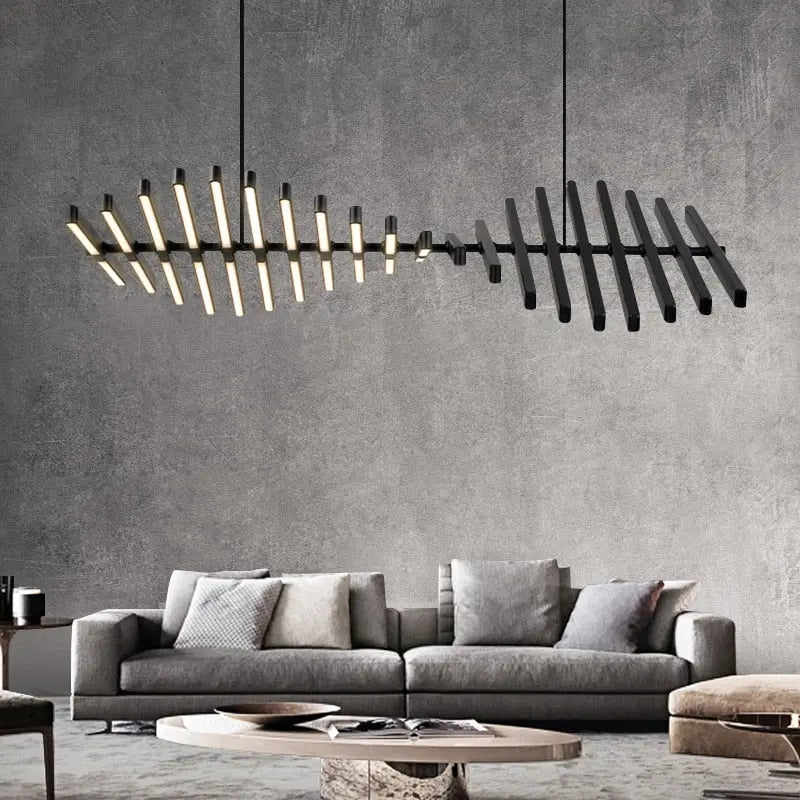
Fixtures with built-in adjustable color and brightness, like the remote-controlled Radiel Modern LED fixture, deliver much of the smart-lighting benefit in a single unit — letting you tune the ambient layer to the time of day without a separate smart-bulb system. Pair adjustable ambient light with an adjustable task lamp and the office adapts to every hour of the working day.
Protecting Your Eyes Through a Long Day
Beyond the fixtures themselves, a few placement and habit points make the biggest difference to eye comfort:
- Never place a light directly above or behind your screen — it creates glare and forces your eyes to fight the contrast.
- Keep bulbs out of your direct line of sight — a visible bare bulb in your field of view causes strain even if the desk is well lit.
- Match screen brightness to the room — a screen much brighter or dimmer than its surroundings tires your eyes.
- Reduce contrast, don't just add light — even, balanced lighting across the room beats one bright source in a dark room.
- Follow the 20-20-20 habit — every 20 minutes, look at something 20 feet away for 20 seconds, giving your focus muscles a rest.
- Use warm, dimmed light for evening work to signal wind-down and reduce late-day strain.
Common Home Office Lighting Mistakes
- Relying on one overhead light. A single fixture casts desk shadows and fights the screen; layering with task light is the fix.
- Putting the desk with a window behind or in front of the screen. Both cause glare — the window belongs to the side.
- A light directly above or behind the monitor. Guaranteed screen glare and contrast strain.
- Cool white light in the evening. Fine for daytime focus, but harsh and alerting when you're trying to wind down.
- Ignoring CRI. Low-CRI bulbs make documents and your video-call appearance look off.
- No dimming or adjustment. Office needs change hour to hour; fixed light can't follow the daylight or the task.
Task, ambient, and adjustable fixtures for a workspace that works.
Floor Lamps Table Lamps Ceiling Lights Pendants Modern Fixtures
Frequently Asked Questions
What is the best lighting for a home office?
The best home office lighting layers three sources: ambient overhead light so the room isn't dim against your screen, task light at the desk for focused work, and natural light positioned to the side of your monitor. Aim for 300–500 lux at the desk, use neutral-to-cool white (3500K–4500K) for daytime focus with the ability to warm it in the evening, and choose CRI 90+ bulbs. The most important single element is an adjustable task light placed to the side, since that's what prevents the eye strain and fatigue of long screen work.
How do I set up lighting for a home office?
Start with the desk position: place it so a window is to the side of your screen, never behind or in front of it. Add ambient overhead light to fill the room evenly and reduce the contrast between the screen and its surroundings. Add an adjustable task lamp at the desk, positioned to the side opposite your writing hand so it doesn't cast shadows. Put the fixtures on dimmers or smart control so you can shift from bright, cool daytime light to warm, soft evening light. Keep all bulbs out of your direct line of sight and off the screen.
What color temperature is best for a home office?
For daytime focused work, neutral-to-cool white in the 3500K–4500K range supports alertness and concentration by mimicking daylight. For evening work or an office that doubles as a relaxing space, warmer light around 3000K is gentler on the eyes and helps you wind down. The ideal setup uses adjustable or smart lighting that shifts cooler and brighter during the workday and warmer and dimmer toward evening — matching your natural circadian rhythm rather than locking you into one temperature all day.
How bright should home office lighting be?
Aim for roughly 300–500 lux at the desk surface for general office work, rising toward 500–750 lux for detailed visual tasks like fine reading or drawing. That's noticeably brighter than typical living-room lighting because focused work demands it. In bulb terms, combine a task lamp delivering a few hundred lumens onto the work area with ambient light filling the room. The goal is comfortable, even brightness across your whole field of view — too dim strains the eyes, and too bright creates its own glare-based fatigue.
Where should I put my desk in relation to the window?
Position the desk so the window is to the side of your screen. A window behind your monitor turns the screen into a dark silhouette against bright glare; a window in front of you (behind the screen) shines directly into your eyes and washes out the display. A side window gives you daylight's mood and focus benefits without either problem. If strong sun causes glare at certain hours, use blinds or sheer curtains to diffuse it rather than block it — the aim is to control natural light, not eliminate it.
How do I reduce glare on my computer screen from lighting?
Address the sources in order. Position the desk so windows are to the side, not behind or facing the screen. Never place a light fixture directly above or behind the monitor. Keep bulbs out of your direct line of sight. Raise the ambient light in the room so the screen doesn't stand out against a dark background — much of what feels like glare is actually contrast strain. Match your screen brightness to the room's light level. And if daylight glare is unavoidable at some hours, blinds or an anti-glare screen filter handle the rest.
Is smart lighting worth it for a home office?
The home office is one of the best rooms for smart lighting, because its needs change through the day in ways a fixed fixture can't follow. Smart or adjustable lighting lets you shift color temperature — cooler and brighter for morning focus, warmer and softer toward evening — and dim without getting up, matching the light to both the task and the fading daylight. Scheduling can even help mark the start and end of the workday, which matters when work and home share a room. A fixture with built-in adjustable color and brightness delivers much of this benefit in a single unit.
What kind of light is best for video calls?
For video calls, you want soft, even light on your face from the front — ideally natural light from a side window, or a diffused lamp positioned in front of you rather than overhead or behind. Avoid backlighting (a window or bright fixture behind you turns you into a silhouette) and harsh overhead light (which casts unflattering shadows). High-CRI bulbs keep your skin tones looking natural rather than washed out. If your office lighting is set up well for work with the window to the side, a repositionable lamp for call times covers the rest.
How do I light a home office to reduce eye strain?
Reduce contrast and eliminate glare. Add ambient light so your bright screen isn't fighting a dark room — that contrast is a leading cause of strain. Use an adjustable task light from the side for focused work. Keep all bulbs out of your line of sight and off the screen. Choose warm, dimmable light for evening sessions. And build in habits: match screen brightness to the room, and follow the 20-20-20 rule — every 20 minutes, look at something 20 feet away for 20 seconds to rest your focus muscles. Even, balanced lighting matters more than simply adding more light.
Can I use a chandelier or decorative fixture in a home office?
Yes — as the ambient layer, not the whole solution. A decorative ceiling fixture adds character to an office that doubles as a video-call background or a room you enjoy spending time in, and it fills the room with the general light that reduces screen contrast. What it can't do is replace task lighting: no overhead fixture, however attractive, delivers the focused, side-angled light your desk needs without casting shadows. Pair a decorative ambient fixture with an adjustable task lamp, ideally both dimmable, and you get both character and function.
Wrapping Up
Good home office lighting is mostly about comfort and function: layer ambient and task light, position your screen sideways to the window, hit around 300–500 lux with neutral-cool daytime light and high CRI, and keep every bulb off your screen and out of your eyeline. Add dimming or smart control so the light follows the day, and the office becomes a place you can work in comfortably from morning to evening.
For ideas focused specifically on productivity, see the companion guide to office lighting ideas that boost productivity. To start building your setup, browse floor lamps and table lamps for task light, and ceiling lights for the ambient layer.


